Many things were added in Luduvo 45
-
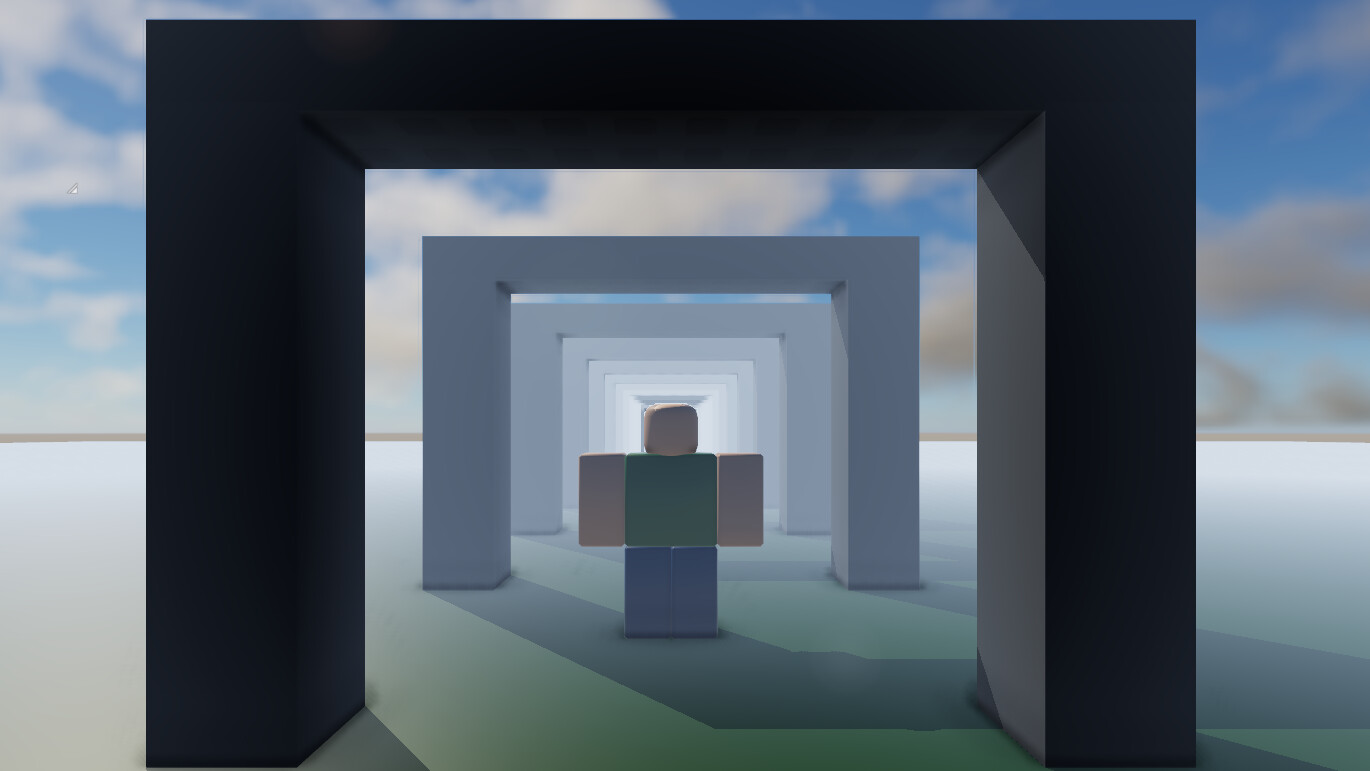
Worlds can now fade into distance fog.
Thanks @Kuuttero
Luduvo should have an inbuilt fog system -
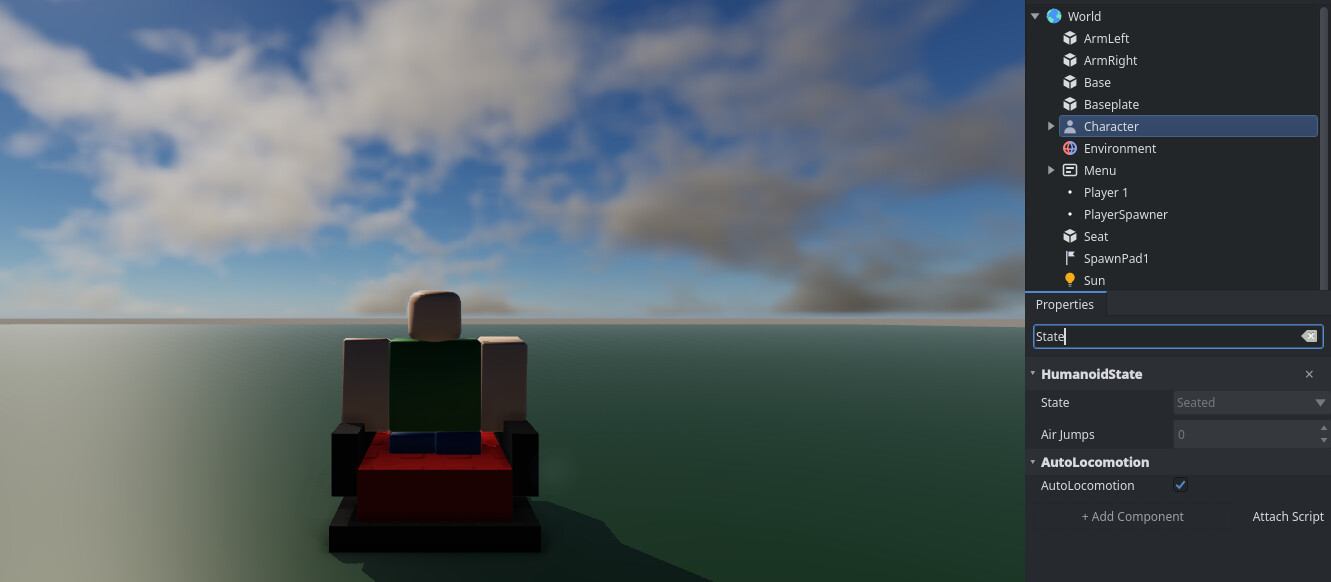
Characters sit down when they touch a seat. Press Space to get up. Driver
seats use the W and S keys for throttle and A and D for steering. -

Climbable component
-
The in-game player list no longer stops at 32 players, so big servers show
everyone. -
Volumetric clouds in skies with sunlight attenuation and dynamic
weather by @Nikhil -
Sounds can now face a direction and get quieter when you’re behind or beside
them. -
Hovering over interactive objects displays a hand cursor to show you can click
them. -
You can drag floating windows by their title bar and resize them from the
corners. Confirmation dialogs now appear centered, dim the background, and
close with Escape. -
Search boxes have a clear button.
-
Surfaces show specular reflections and light from the sky. Cubemap skies
project ambient lighting onto surroundings. -
Dark scenes and solid surfaces no longer show noise or dither grain. Text
outlines stay sharp with a minimum thickness of one pixel. -
The on-screen Escape key hint now fades out after 12 seconds.
-
Servers reject duplicate connections from the same device to prevent
multi-account abuse.
Thanks @lensa
You can launch 2 clients on the same accounts at once -
The Windows client now defaults to Direct3D 12 for reliable startup. The
client automatically switches to Vulkan if graphics initialization fails.
Thanks @Jediweirdo
[Windows] Luduvo App does not try to load DX12 Graphics if Vulkan Graphics Pipeline Fail
For Creators
-
Drag files and folders from your file manager into Studio to import them
directly into the active folder. Double-click or press Return on a mesh file
to insert a part with that mesh into your scene.
Thanks @Evrayne
How do I import a model? -
Insert an empty Model container from the Add menu to organize your scene
hierarchy. The empty model provides Name and Transform controls without
attached geometry.
Thanks @BroDadi
Empty objects -
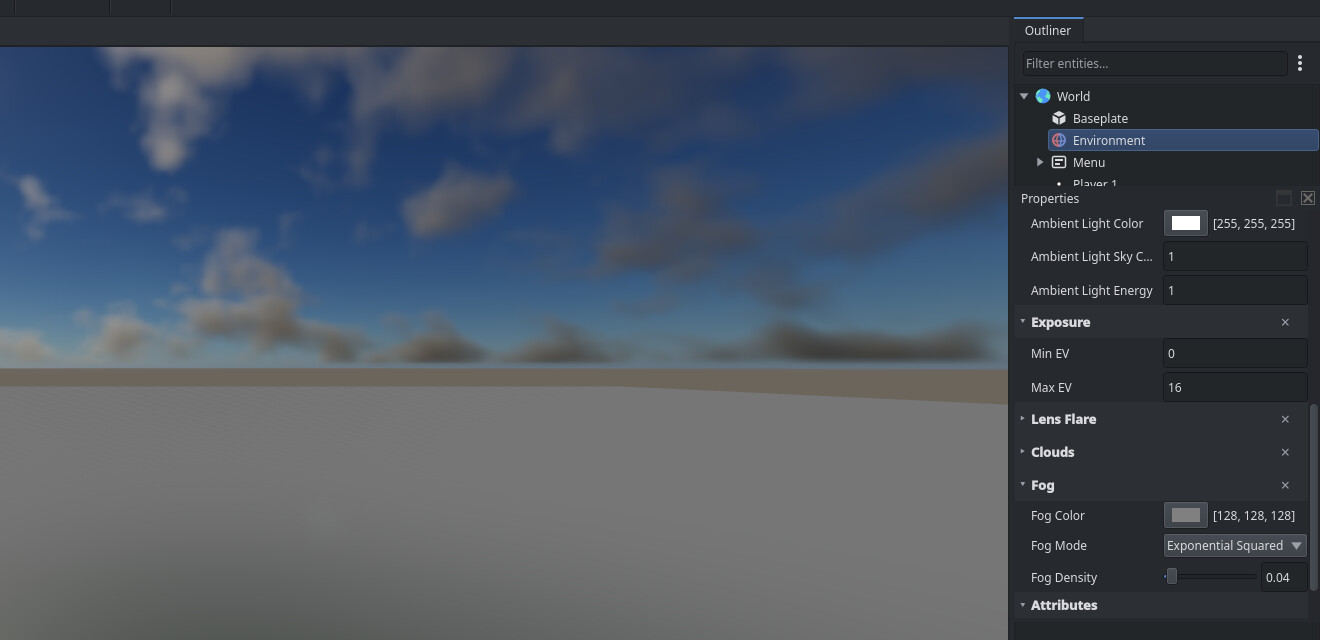
Select the Environment object in the Outliner to edit fog, ambient light, and
sky in the Properties panel. Fog controls provide color, mode, density, and
start and end distances.
Thanks @Kuuttero
Luduvo should have an inbuilt fog system -
Open View > Platform to toggle core platform systems like Avatar, Tools, and
Chat. Add a script under the Platform object in your scene to replace default
platform behavior.
Thanks @Wildpaintbrush
Expose the Default Character Controller as a reusable Core Script -
Drop selected objects directly onto the surface below with PageDown. Press
Ctrl+Alt+M or use the Outliner context menu to align objects with your
viewport camera. -
The Asset Browser supports Ctrl+C to copy, Ctrl+X to cut, and Ctrl+V to paste
files. Press Ctrl+D to duplicate files and Ctrl+A to select all items. Press
F2 to rename any file or folder instead of only prefabs. -
Right-click empty space in the Asset Browser to open the folder in your file
manager. Double-click unmanaged files to open them in desktop apps, or
right-click scripts to copy their path.
Thanks @Jediweirdo
"Open in File Explorer" option for Client, Server, and Server (Luduvo) Components -
Asset Browser toolbar buttons create folders, refresh contents, navigate up,
and sort files by name, type, or date. Press Ctrl+L to edit the path bar, and
press Escape to clear search queries. -
Drag assets from the Asset Browser directly into Properties and Materials
reference slots. Press Delete or Backspace to clear assigned slots, or use
Ctrl+C and Ctrl+V to copy and paste asset IDs. -
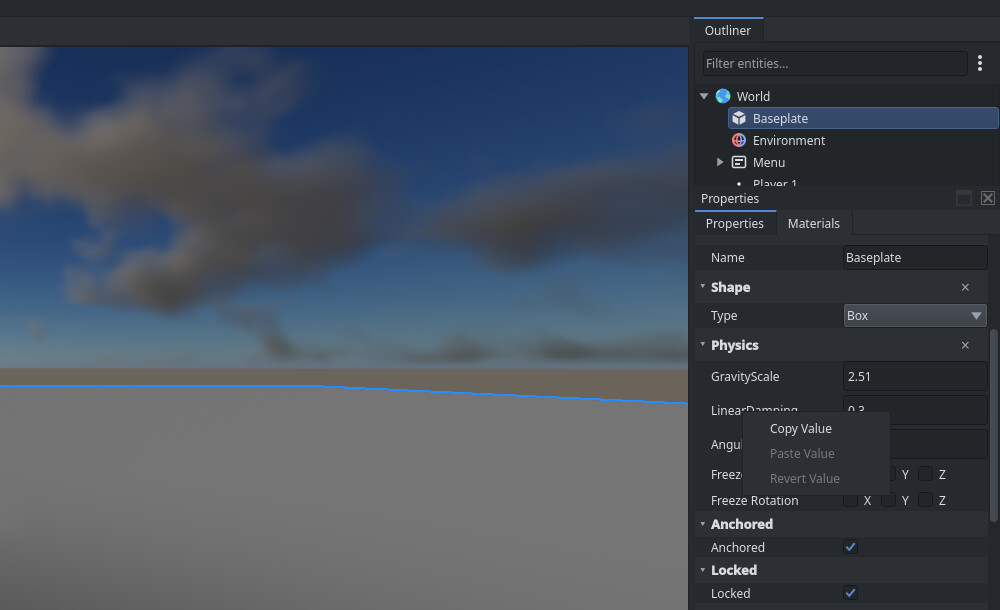
Right-click any property row in the Properties panel to copy, paste, or revert
values across selected parts. Drag horizontally across numeric fields to scrub
values, hold Shift for fine adjustments, and press Escape to cancel.
Thanks @radi
Copy attribute/value/etc to selected -
Edit two-component vector properties in the Properties panel with expandable
numeric inputs. Name, DisplayName, and text properties now edit as plain text
rather than read-only IDs. Collapsible section headers also toggle with Enter
and Space. -
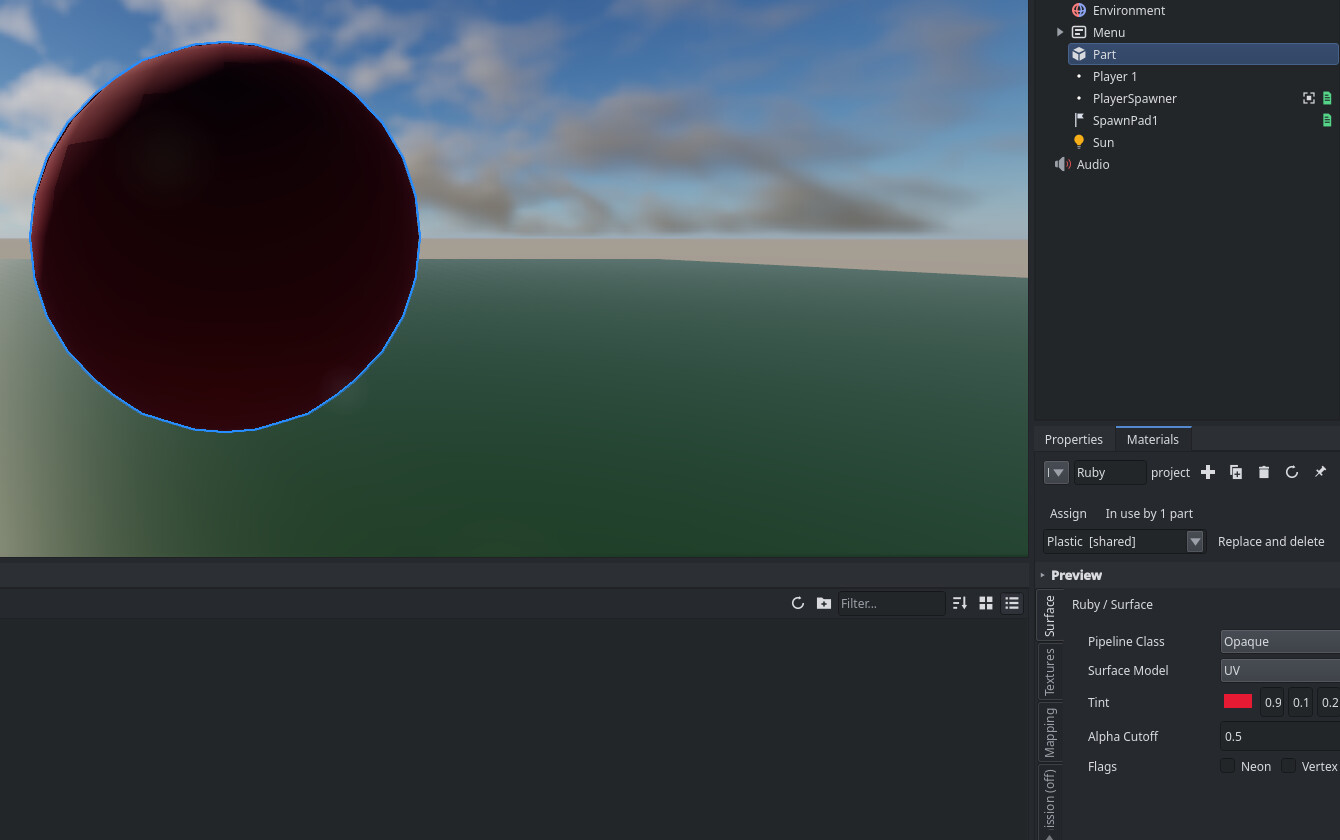
Set Materials panel tint, emissive, and absorption colors with visual color
swatches or the RGB color picker dialog. Click revert buttons beside
properties to restore individual fields to defaults.
Thanks @Tepiggo
Color Conundrum -
Click Assign in the Materials panel to apply the active material to selected
parts. Click the use count to select all parts using it. Selecting a part
opens its material automatically, with a pin toggle to lock editing. -
Press Ctrl+Shift+N in the Materials panel to create a material, Ctrl+D to
duplicate, and Delete to remove it. Press Alt+1, Alt+2, or Alt+3 to switch
preview meshes. Arrow keys now step numeric values and apply them immediately. -
Type in the Outliner search filter to match object names and expand matching
groups. Press Ctrl+L to lock selected parts from viewport clicks, and press
Ctrl+Shift+L to unlock them. -
Select objects in the Entity Report panel with a single click instead of
double-clicking. Press Alt+P to cycle filter presets, press Ctrl+F to focus
search, and click column headers to sort. -
Creating or inserting scripts now opens them in the Script Editor immediately.
Editing with multiple cursors is faster. -
Starting a play session focuses character controls immediately instead of
leaving focus on prior widgets. Clicking the viewport in play mode restores
control focus. -
The Output panel bottom toolbar toggles Info, Warn, and Error filter buttons
for log output with real-time text search. Consecutive duplicate messages
collapse into a single line with repeat count badges.
Thanks @Explorer
Debug Log QOL -
Press Ctrl+Alt+K or click the toolbar button to clear the Output panel, and
right-click to copy all messages. Press Alt+O to toggle dock visibility, and
press Tab in the command line to complete commands. -
Press Return or keypad Enter to activate focused items in the Asset Browser
and Profiler panel. Ribbon tabs accept Tab keyboard focus and navigate with
arrow keys. -
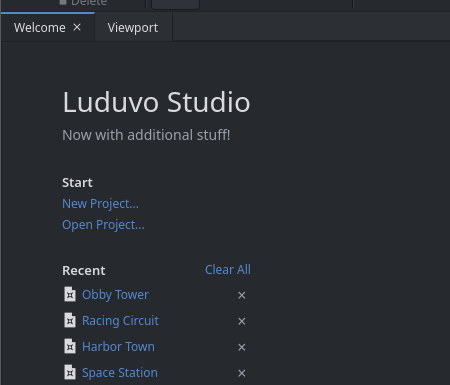
The Welcome screen recent projects list displays project details, folder
icons, and path tooltips. Creators can navigate entries with Tab and remove
missing projects with Return, Delete, or Clear All. -
Studio uses Direct3D 12 on Windows, Vulkan on Linux, and Metal on macOS.
-
In the Profiler, click a script table column to sort it. Graphs follow your
theme, and frame spikes are labeled. -
Publishing a place no longer saves core scripts or menu objects into it.
Upgrading an older place now adds default lighting.
Thanks @Jediweirdo
Make it harder to accidently edit Core Assets (menus, libraries, etc.) -
Import six face textures through File > Import to create skybox cubemaps. Add
the OrthographicLens component to cameras for parallel 2D and isometric
projection views. -
The UvTransform component adjusts texture tiling, offset, and rotation on
parts and decals. -
Add the SoundCone component to a sound source to point its sound in one
direction. Set Cone Inner Angle, Cone Outer Angle, and Cone Outer Gain in the
Properties panel. -
Add the ClickDetector component to parts and models to detect player clicks.
Scripts get the clicking player through theMouseClickevent on the
server, andMaxActivationDistancesets how close players need to be.
Thanks @Sphere
How to in specific script check if player clicked on model named "one" -
Add the Climbable component to parts to turn surfaces into climbable ladders.
-
Add Seat and VehicleSeat components to create passenger seats and driver
stations with throttle and steering inputs. -
The Trigger component defines non-solid collision zones that detect object
touches. The Timer component provides countdown timers with configurable
duration and autostart settings. -
Rigid bodies include axis freeze checkboxes in the Properties panel to lock X,
Y, or Z movement and rotation. Welds support a rotational break torque
threshold, and colliders support capsule shapes. -
Add RopeConstraint components with integrated winch motors to connect bodies.
Configure vehicle suspension springs, tire slip curves, and revolute
HingeJoint limits directly in Studio. -
Assign six custom body part meshes in the Properties panel to customize
character appearances. Add AirControl, MultiJump, CharacterGravity, or
CharacterSurfaceAlign to enable mid-air strafing, extra jumps, custom gravity,
or wall walking. -
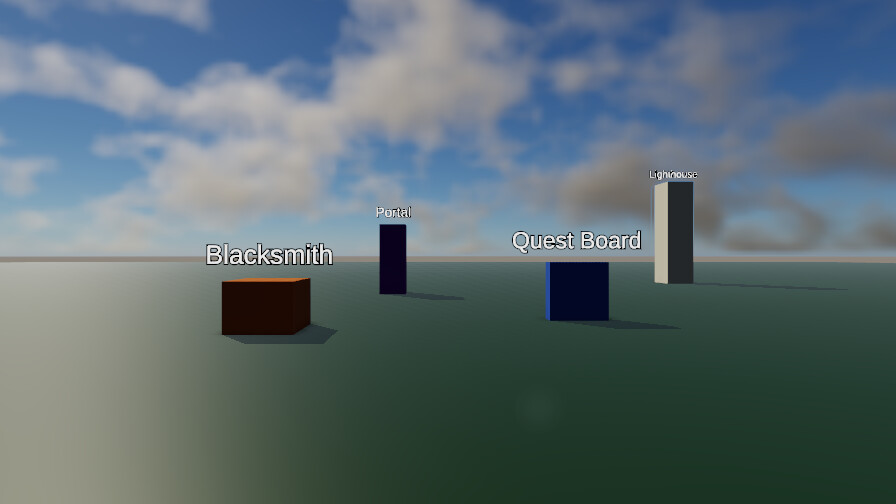
World-space billboard text labels display custom text above objects with
distance scaling. -
Place on-screen virtual thumbsticks with configurable radius and follow modes.
Insert user interface elements including modal dialogs, tabs, dropdown menus,
tables, and color pickers.



Breaking Changes
-
Places saved offline with Luduvo 44 open dark in Luduvo 45 because they don’t have
Sun and Environment objects. Worlds stored on Luduvo servers were converted.
A fix for local files is in progress. -
The Materials panel removed hierarchical sub-page navigation, Back buttons,
and the Escape key shortcut. Click the vertical side tabs to switch between
material sections. -
Reading or writing
game.Lighting.Skyraises a runtime error because the
engine removed the sky table. Read or writegame.Lighting.Backgroundfor
sky colors andgame.Lighting.Ambient.Contributionfor ambient light. -
Calling
Instance:GetIdentityon player character objects raises a runtime
error. Callgame.Players:Getwith a user identifier or
game.Players:FromCharacterto inspect player properties. -
Mouse button query functions now use standard 0-based indices where 0 is
Left and 1 is Right. Callinggame.Input.ButtonDown(1)or
game.Input.ButtonPressed(1)now tests the Right mouse button instead of
Left. Passgame.Input.Button.Left,game.Input.Button.Right, or updated
numeric indices to mouse queries. -
KeyCode enum values changed from sequential numbers to Windows Virtual-Key
codes. Scripts passing old numeric constants togame.Input.KeyDownquery
incorrect keys or trigger range errors. Pass named constants from
game.Input.Keyor updated Windows Virtual-Key codes to key queries. -
Character limbs contacting static or anchored parts now fire
Touchedand
TouchEndedevents. Update touch event handlers on floors and character limbs
to handle contact from walking on anchored parts. -
Reading
Instance.UserIdreturns an integer number instead of a decimal
string. Scripts comparingInstance.UserIdagainst strings now evaluate to
false. CompareInstance.UserIdagainst numbers or wrap it intostring
for string comparisons. -
Client scripts can no longer change, move, or destroy objects that the server
owns. These calls now raise an error. Make such changes in server scripts, or
ask the server through a remote event. -
Core scripts saved directly in place files no longer persist across saves.
Create a root object namedPlatformand place replacement scripts with
matching names under it to override defaults. -
Studio renamed the File menu action “Export Model…” to “Export
Selection…”. Choose File > “Export Selection…” or run the command
file.exportselectionto export selected objects. -
Scripts are now limited to 256 MiB of memory. Going over the limit triggers
garbage collection first, then an out-of-memory error. Release tables and
assets you no longer need. -
Server calls to
Sound.PlayAtreplicate audio only to clients within 200
studs of the sound position. Play audio locally in client scripts for sounds
that all players must hear regardless of distance. -
Dedicated servers refuse a second user account from the same computer. Use
Studio local playtesting or separate computers to test multiplayer game
sessions. -
Client-local objects sent across remote events now arrive on the server as
nil instead of dropping the packet. Check remote event arguments for nil in
server handlers before reading object properties. -
Reading
Instance.NameIdorInstance.DisplayNameIdreturns nil. Read
Instance.NameorInstance.DisplayNamedirectly as strings instead of
reading numeric identifiers.
Scripting
-
Characters can hold unlimited tools in their backpack instead of ten. Parent a
tool to a character and settool.BackpackSlotto any slot number. -
The task library provides
task.defer,task.delay, andtask.waitto
schedule functions without counting elapsed frames. Thetask.waitfunction
pauses the running thread and returns the actual elapsed time.
Thanks @Vadimosolo
Alternative to while wait(1) -
game.Tween.TweenProperty(target, property, final, duration)animates values
over time. The function transitions numbers, vectors, and colors. -
game.CloudStore.open_ordered(name)manages sorted records for game
leaderboards. The returned store provides:set(),:get(), and
:get_sorted()for ascending or descending queries.
More changes for scripters (33)
-
Sound objects control playback with
:Play(),:Pause(),:Resume(), and
:Stop(). -
DynamicMesh.new()creates procedural meshes from Luau buffers.
:SetCounts()sets vertex and index counts.:WriteVertices()copies buffer
data, and:Apply()assigns geometry. -
Instance.new(name?)creates a blank Instance directly from scripts without
cloning existing objects. -
Relationship queries find all objects linked to a target by passing
World.Pair(relation, target)intoWorld.Queryfilters. -
game.Playersprovides access to connected players. The service includes
All(),Get(),FromCharacter(),CharacterOf(),BindCharacter(), and
Kick()methods alongside connection signals. -
Client scripts send chat messages with
game.Players:Chat(message). Scripts
listen for player messages withgame.Players.PlayerChattedand
player.Chatted.
Thanks @empire
Add Chat API -
UIDialog displays modal confirmation boxes. Set button labels with
DialogTitle,ConfirmText, andCancelText, and listen toConfirmedand
Canceledsignals. -
Custom component fields support iteration with standard
for field, value in instance.ComponentName doloops. -
Tags.GetInstanceAddedSignal(tag)andTags.GetInstanceRemovedSignal(tag)
track tagged objects without polling. -
signal:Disconnect(fn)removes a registered callback and stops receiving
dispatches on that connection. -
The remote content service downloads and instantiates remote asset bundles
withgame.Content.Fetch(id, sha256?, cb)andgame.Content.Spawn(asset).
game.Content.Avatar(player, cb)fetches player avatar manifests. -
instance:TransformPoint(pos)andinstance:InverseTransformPoint(pos)
transform 3D coordinates.instance:LookAt()rotates instances toward target
points.
Thanks @yeno
Add "CFrame Lib*" -
Timer objects run timed events with
:StartTimer()and:StopTimer(). Read
remaining time withTimeLeftand connect to theTimeoutsignal. -
instance:AddAccessory(accessory)attaches accessory models to character rigs
and non-player characters. -
Setting
part.Trigger = trueallows objects to pass through collision shapes
while firingTouchedandTouchEndedevents. -
Perception systems configure character sight and hearing with
SetVisionCone
andSetHearingSense. Query perceived objects with
GetNearestPerceivedTargetandGetLastHeardStimulus. -
UIJoystick adds virtual thumbsticks to interfaces to read stick directions.
ConfigureStickRadius,StickDeadzone, andStickMode, and read direction
fromStickDirection. -
Interactive interface elements fire
PressedandReleasedsignals to detect
pointer down and pointer up edges. -
textBox:CaptureFocus()focuses text fields programmatically. Read live
keystrokes throughTextandChanged('Text'), and receive typing completion
viaFocusLost(enterPressed). -
UISlider now supports vertical orientation via
TrackAxis = 1. Connect to
DragEnded(edited)on release, and format numbers using
slider.SliderFormat. -
UIListClipper recycles row elements across large lists. Set
ItemCountand
ItemHeight, and populate rows when theItemShownsignal fires. -
UITableHeader and UIHeaderCell add sortable headers to grid views. Read
SortColumnandSortDescendingproperties to sort tabular records. -
UIPlot graphs stream dynamic data with
instance:PushSample(value). Configure
SampleCount,PlotColor3,ScaleMin, andScaleMax. -
AdornmentHandles attach translation arrows and rotation rings to parts.
Connect toPressed,DragMoved, andReleasedto handle player drag
actions. -
VehicleSeat parts report driver movement keys through
seat.Throttleand
seat.Steer. Seat parts provide the seated character instance through
seat.Occupant. -
World.Systemnow schedules callbacks acrossPreUpdate,PrePhysics, and
PostPhysicsstages and runs systems in dependency order. -
instance:FindAncestorWithComponent(name)searches ancestor trees,
instance:GetDescendants()retrieves descendants, andinstance:SetParent()
reparents while preserving world pose. -
The
Visibleproperty now works on parts, meshes, and lights, driving
RenderDisabledto hide geometry without losing collisions. -
instance:ApplyTorqueImpulse(impulse)applies angular impulses to bodies, and
Physics.Raycastnow accepts an optional collision mask. -
game.Prefabs.RevertAddedComponent(instance, name)removes added components.
game.Prefabs.RevertObjectOverride(instance)restores authored template
properties. -
Custom attributes on objects now have no per-entity cap, and script handles
support unlimited target links and slot names. -
Client scripts can now edit client-local parts without rejection, and
Sessionlifecycle signals fire on clients. -
game.Players:FriendStatus(player)queries player relationship status, and
game.Players:IsAdmin(player)provides a dedicated admin check.
Fixed
-
The camera no longer sticks to walls or locks its zoom when obstructed.
Thanks @SAD
Camera bugs out and breaks against wall -
Players no longer jitter or bounce while riding lifts and moving anchored
parts.
Thanks @zed
Player physics completely fall apart when standing on a moving part -
Characters no longer get stuck in the freefall state when standing on other
players.
Thanks @Nugget
Standing on Others Heads and Moving Won't Work -
Minimizing or resizing the game window no longer freezes rendering or crashes.
Thanks @Victor
Luduvo engine window freezes when minimizing and restoring it -
Directional sunlight no longer leaks through solid walls and roofs into
enclosed rooms. -
The game no longer crashes on a black screen at launch on Windows systems with
AMD graphics cards.
Thanks @666
Game crashes on black screen when launching (mostly amd users) -
Switching display modes to fullscreen no longer crashes the game.
Thanks @ferry
Null pointer dereference at offset +0x130 causing SIGSEGV when enabling fullscreen -
Closing the chat box with the Escape key no longer breaks mouse capture and
camera control.
Thanks @fox
mouse stops getting captured after opening and closing chat without sending anything
More fixes (52)
-
Selecting Leave Game in the escape menu now exits play testing cleanly without
closing the project or losing unsaved edits.
Thanks @Shark
MAJOR BUG: Using the leave game button inside of studio corrupts your world.ldv file -
Opening a script in the editor no longer crashes on 64-bit Windows.
-
Client scripts no longer run top-level code when opening a project before play
testing begins.
Thanks @Jediweirdo
[Windows] Client Scripts Do Not Stop Referencing Stale/Cleaned Up ECS World State Upon Initialization/Hot Reload -
Anchored and duplicated parts no longer snap back to old positions after
release. -
Rotating several selected parts no longer crashes Studio.
Thanks @Snougy
Studio Crashing when moving too many parts were rotated -
Moving a group now moves child parts instead of only moving the model
origin. -
Dragging parts on scaled shapes no longer pushes them into surfaces or
adjacent parts. -
Mouse clicks no longer land above the cursor on scaled Windows displays.
Thanks @Ghost
Mouse is detected far above actual cursor making low positioned textbuttons unclickable in studio -
Pressing Delete in the Asset Browser file list now deletes files instead of
scene objects. -
Folder refreshes in the Asset Browser no longer clear selected items.
Right-clicking an unselected item selects it before opening the context menu.
Drag selection now draws across empty space. -
Right-clicking empty space in the Outliner no longer leaves the previous
selection active. Internal session objects no longer appear in the Outliner. -
Selecting Audio in the Outliner no longer leaves the Lighting panel displayed.
Thanks @jack
Audios don't function when scripted / Clicking Audio opens Lighting Tab -
Play session characters no longer show detached limbs in the Outliner.
Pressing Escape during play mode no longer freezes Studio with attachment
warnings. -
Opening the Entity Report panel during play sessions no longer shows stale
data. -
game.Input.KeyDownno longer fails on keys outside the first 34 keys.
Thanks @0v3r5e3r
game.Input.KeyDown keycodes are incorrect according to the Luduvo Documentation -
game.Input.ButtonDownandgame.Input.ButtonPressedno longer reject
standard mouse button numbers.
Thanks @lua
Input ButtonDown Incorrect -
game.Physics.Explodeno longer applies blast forces at stale coordinates.
Thanks @rek
Physics.Explode occuring in the wrong place -
Loading 20 or more scripts in a place no longer causes a stack overflow crash.
-
Comparing two references to the same custom component with
==now
returns true. -
Writing unchanged values to object properties no longer triggers unneeded
network updates and change events. Setting RGB color properties no longer
corrupts adjacent transparency values. -
Cloning objects with child hierarchies or calling
Cloneduring place load no
longer crashes. -
World.Systemcallbacks no longer fail to run in client scripts. -
Text inputs created from scripts with the default
MaxLengthof zero no
longer reject player typing. -
Creating a weld joint between a moving part and an anchored part no longer
crashes.
Thanks @builder
Unable to weld things in Luduvo studio -
Character limbs no longer reset to default collision rules during state
changes.
Thanks @Maky
Collision Groups not working -
Published accessories no longer float several studs above character attachment
sockets.
Thanks @GrooviGremlin
Select accessories don't fit on avatar -
Characters no longer keep walking after releasing movement keys under packet
loss. -
Characters standing on unanchored rolling spheres no longer launch into the
air. -
Characters no longer encounter floor orientation errors when walking across
ledges and ramps. -
Fallen and knocked-down character bodies no longer jitter and now settle to
rest. -
Character torso pose rotations no longer drop during animation playback.
-
Accessories and attachments no longer drift away from characters under server
load. -
Characters no longer remain tilted and tumble indefinitely after a knockdown.
-
Character rigs no longer lose limbs when loading places.
-
Running under Direct3D 12 graphics on Intel hardware no longer crashes at
startup.
Thanks @Jediweirdo
[Windows] NVRHI fails to compute pipline state objects when running Luduvo under DX12/D3D12 Graphics -
Ambient occlusion no longer creates halo and ghosting artifacts around
character and object silhouettes.
Thanks @Maky
Weird halo/ghosting effect -
Surfaces flush with walls no longer flicker or disappear at certain camera
angles.
Thanks @meme2
The parts around me disappear in certain camera angles -
Walking onto surfaces without step sounds no longer replays the previous
material audio.
Thanks @Mrrfy
Walking sounds from one material incorrectly persist when falling onto a material with a different sound -
Interface panels, text strokes, and translucent elements no longer display
washed-out colors. -
Characters no longer play physics collision and slide sounds while walking.
-
Sound.PlayAtsound cues no longer fail to play in solo play and singleplayer
sessions. -
Typing into the developer console after running a command no longer crashes on
the next keystroke.
Thanks @ferry
Running Any Command in the Console Crashes Luduvo -
Players on high-latency connections no longer freeze in place for other
players.
Thanks @HYDRA
Players freeze for a short amount of time -
Runtime light changes on the server no longer fail to update connected
players.
Thanks @Nugget
Part set to emit light won't emit light when playing from Luduvo's website, only from Studio. -
Studio no longer crashes at startup on modern Linux distributions including
Linux Mint and Ubuntu.
Thanks @SkeletalMush
Unable to Open Luduvo Studio (Linux Mint Cinnamon 22.3) -
Opening older place files no longer resets assigned materials to None.
Thanks @SAD
Materials feature breaks apart on older project -
The performance diagnostics overlay no longer appears on join when turned off
in settings.
Thanks @Nicky
Diagnostics Setting doesn't Save when Joining Games -
Idle parts no longer freeze in place after 18 minutes of play.
-
The camera no longer spawns disconnected with no controllable character under
high ping. -
Running with vertical synchronization enabled no longer causes display stutter
and input lag. -
Downloading assets over interrupted network connections no longer crashes.
-
Opening places that contain empty script references no longer crashes the
engine.
